NestBoard
Everyone's schedule, chores, meals, and reminders on one screen the whole house can see. Kids or no kids, if you share a home you can share the plan. Set it up in five minutes.
2 weeks free · No credit card · Cancel anytime


Prefer your browser? Use it right here on the web. Private, no ads, on every platform.
Create the household in a couple of minutes. No setup wizard, no credit card.
Send a link to whoever you share the place with: a partner, a roommate, kids, a co-parent. Seats for kids are always free.
Calendar, chores, meals, and meds. One shared view, in sync across every screen.
Calendars are the start. NestBoard adds the layers that make a household actually function (chores, meds, groceries, alerts) and keeps them quietly in sync across web, tablet and phone.
Per-member colors, day/week/month/agenda, recurring and multi-day events. Everyone sees the same thing.
Read morePull from Google, Outlook, iCal, even email-based confirmations. Nothing has to move.
Read moreShared household pool. Assign, rotate, see the history. Optional allowance ties chores to personal wallets.
Read morePer-person dosing (with shared-bottle support). Import any recipe by URL. Pantry-aware AI dinner suggestions.
Read moreMulti-list shared cart everyone can add to. Pantry expiry alerts. Barcode scanner. 'Oat milk' from the kitchen, seen at the store.
Read moreCustom sounds, quiet hours, daily routines, allowance wallets, household savings goals, lightning-storm alerts. Off if not your thing.
Read moreForward an email, paste a text, or just type "soccer Tuesdays at 5 starting next week." Robin turns it into events, asks the right person, and sets the right reminders.
50 badges that recognize the work the household is already doing, across the whole app: chores and streaks, the shopping run, the pantry, projects, carpools, homework, savings goals, the board, and the small moments that keep families talking. No quests, no daily-login carrots, no public scoreboards unless you opt in. Earn one and the app just notices.
Completed your first chore.
Seven days in a row. Real consistency.
Logged a medication dose. The household is safer.
Drove your first carpool run. Wheels up.
A household is whoever coordinates together. We make no assumptions about yours.
Two calendars, one view. Date nights still get on it.
See how it fitsDrop-offs, snack week, school portals, without group texts.
See how it fitsGrandparents, parents, kids. Different needs, one fridge.
See how it fitsShared chores, shared groceries, separate lives.
See how it fitsTwo households, one child's schedule, no awkward forwarding.
See how it fitsTrack meds, visits, and appointments for someone you love.
See how it fitsShared vacation house? Coordinate weekends and pantry runs.
See how it fitsNo kids, no chore charts. Just groceries, trips, and two schedules that keep colliding.
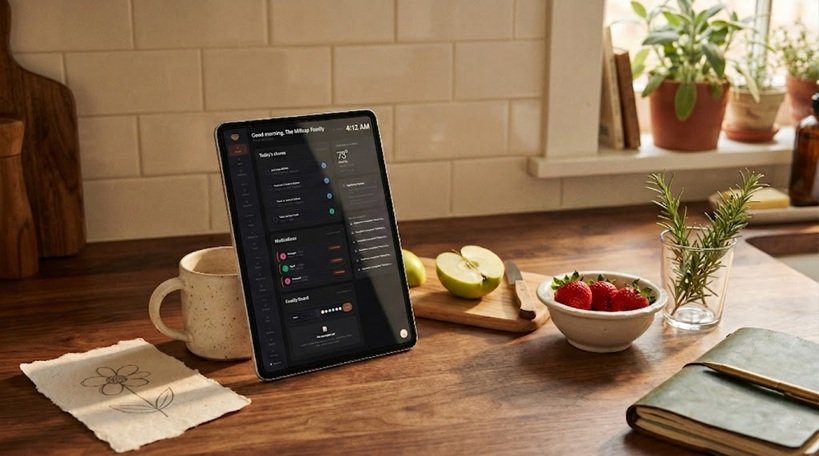
See how it fitsNo new hardware. That old tablet in a drawer, a spare laptop, even the monitor you stopped using. Any of them becomes the family command center on the counter. The dashboard runs beautifully on a 7" wall tablet, a repurposed laptop, or a phone in portrait. Web, iPhone, and Android, all live today. Same household, same view, in sync.
2 weeks free. Then $4.99/month, or $49.99/year (two months free), flat for your whole household, unlimited members. Cancel anytime. Your data exports as a standard calendar file.
Anything else? Email a real person at hello@mynestboard.com. We answer within a day.
No. Web works on anything. NestBoard is live on both the App Store and Google Play, so iPhone and Android households get the same app. Everyone sees the same household.
Yes. Google, Outlook, iCal, and email-based confirmations all sync in. Two-way sync is on the roadmap.
Only what you share with it: typed text, voice notes, dropped images, forwarded emails. It is processed by our AI providers under no-training terms and never used to train any model, and we never sell or share your household data.
Yes. Paste any URL from NYT Cooking, AllRecipes, BBC Good Food, Bon Appétit, or most food blogs. NestBoard pulls in the title, ingredients, and steps automatically.
Yes. Mark a medication as shared and any of the listed members can log a dose, and the doses-remaining count auto-decrements so the bottle math stays right.
Yes. Kiosk mode shows the dashboard full-screen, idle mode rotates a photo slideshow, and the Android app from Google Play keeps it running natively.
No. NestBoard runs in any modern browser, so a spare laptop, an old tablet, or a phone you already own becomes the family screen. Mark a device you leave on as a kiosk and it shows the dashboard. No new hardware required.
Yes. You get an email any time an unknown device joins your household, with the device name, browser, and approximate IP.
Yes. Kid-mode seats are free and don't require an account. Under-13 kids go through a COPPA-compliant parental-consent flow.
Export everything in a standard calendar file. We don't lock anyone in.
“We built NestBoard for our own family, tired of the group texts, the dropped balls, and the mental load of holding the whole house in one person’s head. It’s the shared board we wished we had. I hope it gives your household a little of its quiet back.”
NestBoard is new. Be one of the first households to make the switch, and help shape what we build next.
Prefer an app? Get NestBoard on iPhone or Android.
Live on both the App Store and Google Play. The web app is ready right now too.
2 weeks free. Five minutes to set up. Bring whoever you live with.
2 weeks free · No credit card · Cancel anytime